Cropping an image shouldn’t require heavy software or account registration.
With Toolspires Image Editor, you can crop photos online in seconds — directly in your browser.
This quick guide shows you exactly how to crop images using the built-in Crop Tool at
👉 https://editor.toolspires.com
Why Use an Online Crop Tool?
An online image cropper is perfect when you need fast results without installing anything.
Key benefits:
- No download or signup required
- Works on Windows, macOS, and Chromebooks
- Ideal for social media, blog images, and thumbnails
- Simple interface, beginner-friendly
Step-by-Step: How to Crop an Image Online
Step 1: Open Your Image
Go to editor.toolspires.com.
You can:
- Click File → Open, or
- Drag and drop your image directly onto the canvas
Supported formats include JPG, PNG, WEBP, and BMP.
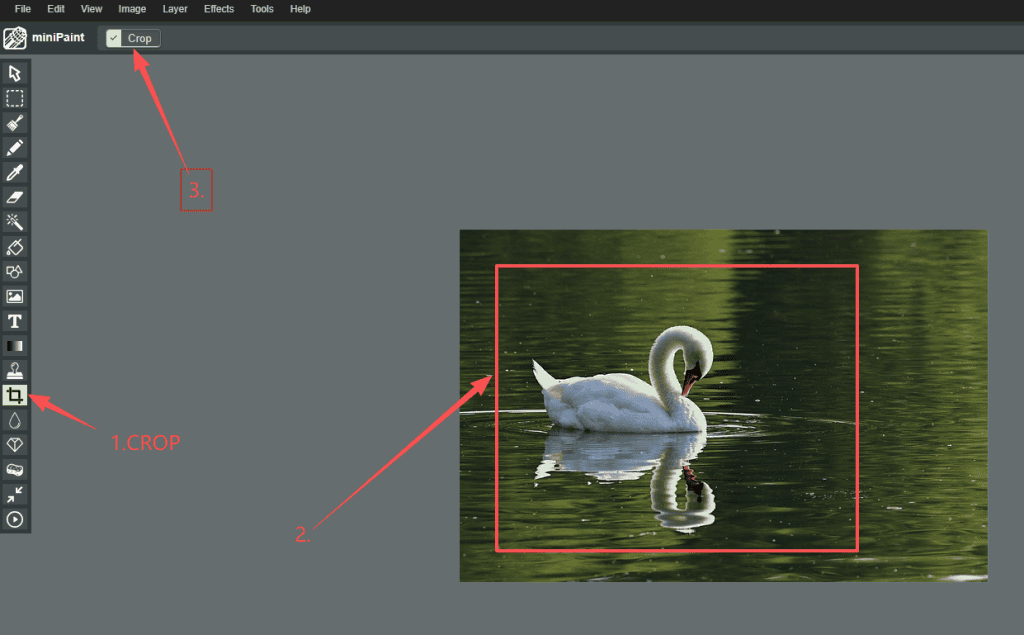
Step 2: Select the Crop Tool
Look at the left toolbar and click the dashed rectangle icon labeled Crop Tool.
Once selected, your cursor will change into a crosshair, indicating crop mode is active.
Step 3: Draw the Crop Area
Click and drag over your image to create a dashed selection box.
- Everything inside the box will remain
- Everything outside will be removed
You can resize or reposition the selection until it fits perfectly.
Step 4: Apply the Crop
When you’re satisfied with the selection:
- Click Image → Crop in the top menu
or - Press Ctrl + Enter (Windows) / Cmd + Enter (Mac)
The image will instantly update.
Step 5: Save Your Cropped Image
To download your result:
- Click File → Save As
- Choose JPG or PNG
- Save the image to your device
You can also press Ctrl + S for quick saving.
Helpful Crop Tips (Power User Tricks)
- Undo mistakes: Press Ctrl + Z
- Keep aspect ratio: Hold Shift while dragging
- Zoom for precision: Use Ctrl + Mouse Wheel
- Perfect for thumbnails: Crop exactly to your required size
Frequently Asked Questions
What image formats are supported?
You can import and export:
- JPG
- PNG
- WEBP
- BMP
Do I need to create an account?
No. Toolspires Image Editor works instantly without signup.
Is this really free?
Yes. The crop tool is completely free to use.
Final Thoughts
If you need a fast, simple, and free way to crop images online, Toolspires Image Editor is an excellent choice.
No installation.
No signup.
Just upload, crop, and download.
👉 Try it now: https://editor.toolspires.com